
Chainlink for Agents
What is it
Give your AI agent access to Chainlink data and onchain workflows, within guardrails and spend limits that you set.
Chainlink for Agents is a service we built specifically for AI agents, built on CRE Connect.
It allows you to turn your agent into an onchain operator. Chainlink for Agents lets your agent correctly execute onchain strategies working from verified pricing data and chain events, with the option to strictly lock down its behavior with onchain guardrail enforcement.
Specifically, with Chainlink for Agents your agent can:
- Query Chainlink Data Streams for low latency pricing data across crypto, equities, treasuries, and more
- Deploy a smart contract wallet for onchain operations
- Call curated endpoints to transfer, bridge, trade, or earn yield on tokens
- Operate under guardrails set by you and enforced onchain
You use the Chainlink platform UI, a separate web app, to link your agent to your organization and set the guardrails it works within.
Chainlink for Agents skills
This repository contains the skills your agent needs to sign up, link to your organization, and run workflows.
What can your agent do
Your agent uses the Chainlink catalog, within the guardrails you set. The catalog lets your agent:
- Get current and past prices from Chainlink Data Streams.
- Look up token details and check its token balances.
- Send tokens such as USDC.
- Swap tokens through Uniswap.
- Check Aave yields and its own positions, and supply tokens to Aave or withdraw them.
- Bridge tokens to another chain with Chainlink CCIP.
Quick start
Use this section to get up and running in less than 5 minutes:
Note: Once you've completed Step 1, your agent will likely prompt you for the remaining steps and should be able to explain each to you as needed.
- Paste the link to this docs page to have your agent to reach the skills repo: [https://github.com/smartcontractkit/chainlink-for-agents]
- Have your agent generate an EVM wallet for signing and paying x402 fees - most agents can do this directly from a simple prompt.
- Send some
USDConBase Mainnetto your agent's new EVM wallet.5 USDCis more than sufficient to start with - Ask your agent to deploy its smart contract wallet (cost:
1 USDC). Your agent will ask you for the public EVM address of a more secure account to use as this smart contract wallet's owner. Pick your preferred address that you control in an existing wallet. - Fund the smart contract wallet with the funds you wish to have your agent control
- OPTIONAL, but recommended: set up guardrails for your agent's wallet
Who is this for
This service is targeted towards, but not limited to, crypto traders who want their agent to operate onchain for them.
Your agent works autonomously, yet still within the parameters you set for it.
How your agent connects to Chainlink
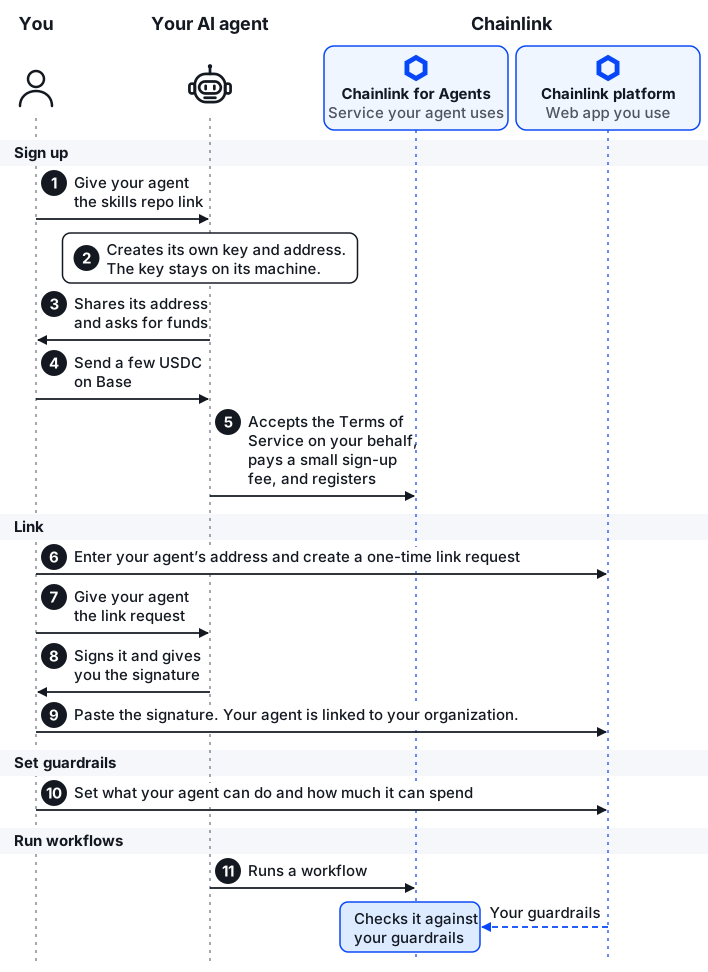
You and your agent go through four phases during the linkup process:
-
Sign up: You give your agent the skills repo link, and your agent creates its own signing key. The key's address is your agent's identity, and the key never leaves your agent's machine. Your agent pays its fees from that address, so it asks you to fund it; a few USDC on Base covers sign-up and your first workflows. Once the USDC arrives, your agent accepts the Chainlink Terms of Service on your behalf, pays a small sign-up fee, and registers with Chainlink for Agents. Its registration limits it to workflows from the Chainlink catalog.
-
Link Up: In the Chainlink platform, you enter your agent's address and generate a one-time token that uniquely identifies your organization within the platform UI. You give this generated token with your agent, which signs it and gives you back a signature. You paste that signature back into the platform. The signature proves that your agent holds the key for that address, so the platform links your agent to your organization.
-
Set guardrails. In the Chainlink platform, you choose which kinds of actions your agent may take: sending, swapping or bridging tokens, and using Aave. Or maybe you want your agent to not want to do any of those actions? You can set that up too. You also choose which wallets your agent may send or bridge tokens to, and how much it may send or bridge per transaction and per rolling 24 hours. Your agent can't change these settings, only you can, using the UI.
-
Execute onchain. Your agent's onchain calls trigger Chainlink Runtime Environment workflows, each requiring a small fee. Workflows build the appropriate calldata for your agent to sign and then submits signed transactions to chain with redundant RPCs, sponsoring gas and handling retries. Chainlink for Agents checks every workflow against your optionally configured guardrails, checks again just before anything is written onchain, and blocks any workflow that breaks a guardrail.
The following diagram shows each step and who takes it.
What's next
- Link your agent to Chainlink: sign up your agent and link it to your organization.